
Instagram Introduces 'Your Activity' Feature for Enhanced User Control
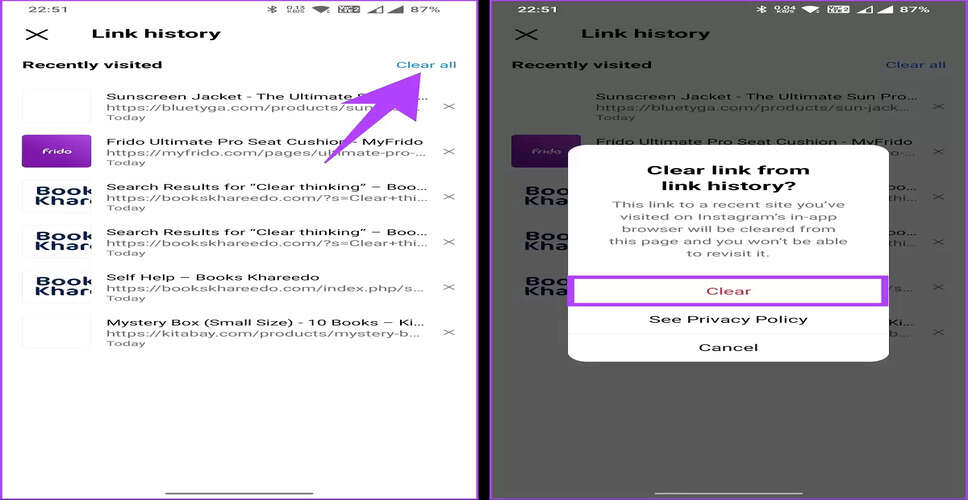
Overview of Instagram's New Feature
Instagram is progressively launching new functionalities aimed at providing users with improved oversight of their data and activities on the platform. A significant addition is the newly introduced section titled “Your Activity”, which allows users to manage, review, and delete their previous interactions all in one convenient location.
What Is the ‘Your Activity’ Section?
The Your Activity dashboard serves as a comprehensive hub for all user actions on Instagram. It enables users to:
- Delete or archive posts, Stories, Reels, and videos in bulk
- Examine interactions such as likes, comments, and reactions to stories
- Filter content based on specific date ranges
- Search through past comments and replies
- Monitor links accessed on the platform
This initiative underscores Instagram's commitment to enhancing transparency and user autonomy.
Benefits of Viewing Visited Links
As users navigate Instagram, they often click on various links—some from friends and others from advertisements or business accounts. The new Links You’ve Visited feature assists users in:
- Revisiting significant websites they may have overlooked
- Tracking links accessed through promotional content
- Reviewing their browsing history within the app
- Gaining better insight into their online activities
This feature is distinct from a traditional browser history, focusing solely on Instagram interactions.
Types of Links Included
The section for visited links may encompass:
- Direct URLs shared in Stories or direct messages
- Links found in profile bios
- Advertisements clicked on Instagram
- Promotional links from posts or Reels
All of these links are conveniently compiled in one location for easy access.
How to Access Your Visited Links: A Step-by-Step Guide
To view your visited links, follow these steps:
- Launch the Instagram app on your Android or iOS device.
- Navigate to your profile page by tapping the profile icon located in the bottom-right corner.
- Click on the three-line menu (hamburger icon) in the top-right corner.
- Select Your Activity from the menu.
- Tap on Links you’ve visited.
- On the subsequent screen, you will find a list of all the links you have accessed on Instagram.
You can click on any link to reopen it in your browser.
Important Considerations
- The list exclusively includes links accessed within Instagram.
- Older links may not be visible if the activity history is limited.
- Feature availability may vary based on app updates.
- Keeping the Instagram app updated is essential for accessing all activity features.
Conclusion
The introduction of the ability to view visited links on Instagram enhances user convenience and transparency. Coupled with tools for managing content and tracking interactions, the Your Activity section simplifies the process of understanding and controlling platform usage. As Instagram continues to develop, features like this emphasize its commitment to improving user awareness and data management.