
Effective Strategies to Locate Your Silent Android Phone

Introduction
Meta Description: Misplaced your Android device on silent mode? Discover six effective methods to track it down using Google Find Hub, Samsung, Xiaomi, Google Nest, a smartwatch, or a Tile tracker.
Tips for Finding Your Lost Android Phone in 2026: Losing your Android phone can be quite stressful, especially if it’s set to silent or vibrate. Simply calling your number may not be effective since the ringtone won’t sound. Fortunately, various device-finding services can assist in locating your smartphone and, in some cases, can even make it ring despite being on silent.
Services like Google Find Hub, Samsung's device-finding tools, and Xiaomi Cloud are available for tracking compatible devices. Additionally, Google Nest speakers, Wear OS smartwatches, and certain Bluetooth trackers can help find a misplaced phone nearby.
As reported by Gadgets Now, these features can be particularly useful if your phone is hidden under cushions, left in another room, or forgotten in a familiar place.
However, not all devices guarantee silent-mode ringing. This capability depends on compatibility, prior settings, account connections, battery life, and network availability.
Here are six practical methods to consider.
1. Utilize Google Find Hub to Ring Your Android Phone
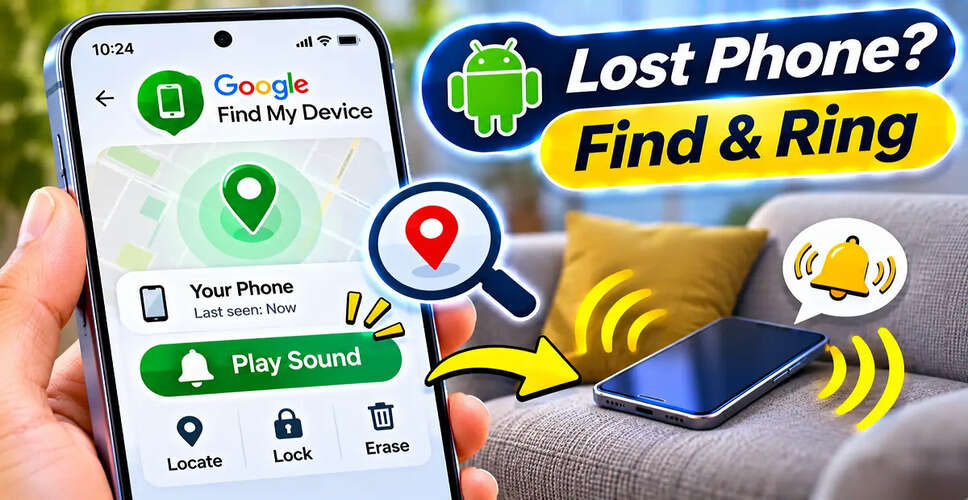
Google Find Hub, formerly known as Find My Device, is one of the easiest ways to locate a lost Android smartphone.
This service can show the location of eligible devices linked to your Google Account and includes a Play Sound feature.
For supported devices, the Play Sound option can make the phone ring loudly for about five minutes, even if it’s on silent or vibrate.
Steps to Use Google Find Hub:
- Open a web browser on another device.
- Go to https://android.com/find.
- Log in with the Google Account associated with your lost phone.
- Select the device from the list provided.
- Click on Play Sound.
- Listen for the ringtone to locate your phone.
When is it effective? The phone must be powered on, linked to your Google Account, and able to receive commands through an active connection. Device-finding settings should also be properly configured.
If the phone cannot receive the ringing command, you may still be able to see its last known location or offline-finding information.
2. Locate Your Samsung Galaxy Phone with Samsung's Services
Samsung Galaxy users have another option through Samsung's device-finding services, including SmartThings Find and other tools linked to their Samsung account.
These services can help locate registered Galaxy devices and may offer a remote Ring feature.
Steps to Follow:
- Access Samsung's official device-finding service on another device.
- Log in with the Samsung Account associated with your Galaxy phone.
- Select the missing smartphone.
- Choose the Ring option available.
- Follow the sound to find your phone.
According to reports, supported Samsung phones can ring for about one minute, even if they are on silent or vibrate.
When is it effective? The Galaxy phone must support this feature, be registered with the appropriate Samsung Account, and meet the service's connectivity requirements. Options may vary based on the model and configuration.
Some compatible devices may also provide nearby-search or navigation features.
3. Find Xiaomi, Redmi, or POCO Phones Using Xiaomi Cloud
Xiaomi, Redmi, and POCO users should check if their phone supports Xiaomi Cloud's Find device service.
This service may offer location tracking, sound playback, and lost-device controls, depending on the device and its settings.
How to Use Xiaomi Cloud:
- Visit https://i.mi.com on another device.
- Log in to your Xiaomi Account.
- Open Find device.
- Select the missing smartphone.
- Tap the Sound option available.
- Listen for the phone.
When is it effective? The Find device feature must have been activated before the phone was lost. The phone also needs sufficient battery power and connectivity to receive a remote sound command.
On supported configurations, the sound function may work even if the phone is on silent.
4. Use a Google Nest Speaker to Find Your Phone
If you have a compatible Google Nest speaker or smart display at home, you can locate your Android phone using a voice command.
Simply say:
"Hey Google, find my phone."
A properly set up Google Assistant may identify your linked phone and trigger a ringing command.
This is especially useful if you think the phone is somewhere in your home.
When is it effective? The speaker and phone must be linked through the correct Google Account and have the necessary device-finding configuration. Required settings, including Voice Match, should be completed in advance.
The phone generally needs to be powered on and connected to a network.
Supported setups may ring the phone even if it is muted or in Do Not Disturb mode, but this behavior is not guaranteed for all devices.
5. Utilize Your Smartwatch's Find My Phone Feature
Many compatible Wear OS smartwatches come with a Find My Phone function.
This feature is handy when your smartphone is nearby but you can’t recall where you placed it.
How to Find Your Phone:
- Wake your smartwatch.
- Access Quick Settings or the app menu.
- Locate Find My Phone.
- Tap the option.
- Listen for the sound from your smartphone.
When is it effective? The smartwatch and phone must support this feature and maintain the necessary connection, typically via Bluetooth.
The phone must also be powered on.
Some compatible watches can make the phone ring even when its normal ringtone is muted.
This method is best for finding a phone within the supported connection range.
6. Use a Tile Bluetooth Tracker
Compatible Tile Bluetooth trackers can also assist in locating a missing smartphone.
Some Tile devices offer a phone-finding function that can trigger a ringtone from a previously paired phone.
How to Use It:
- Install and set up the Tile application on your Android phone.
- Pair a compatible Tile tracker.
- Activate the supported phone-finding function.
- Attach the tracker to an item like your keys or bag.
- If the phone goes missing, press the Tile button twice on supported models.
- Listen for the phone's ringtone.
When is it effective? The tracker must be compatible, properly configured, and within the required Bluetooth range. The phone must be powered on, and the necessary application permissions and connections must remain active.
Supported Tile setups may trigger a sound even when the phone is on silent.
Comparing the Six Methods
Which Method Works Best?
| Method | Can It Ring a Silent Phone? | Main Requirement |
|---|---|---|
| Google Find Hub | Yes, on supported devices | Google Account, finding setup, and command connectivity |
| Samsung device-finding service | Yes, when supported | Compatible Galaxy device and Samsung Account |
| Xiaomi Cloud | Yes, when supported | Find device enabled and required connectivity |
| Google Nest | Possible with supported setup | Linked Google services and compatible speaker |
| Wear OS smartwatch | Yes, on compatible devices | Supported watch and active connection |
| Tile tracker | Yes, on supported setups | Paired tracker within connection range |
Important: Silent mode does not necessarily prevent a device-finding alert from playing. However, a powered-off phone, missing permissions, or unavailable connectivity can hinder the command from functioning.
Can You Find an Android Phone That Is Switched Off?
If a smartphone is turned off or its battery is dead, it typically cannot receive a remote ringing command.
However, Google Find Hub or a manufacturer's device-finding service may show a previously recorded location.
Some supported Android phones can also join offline-finding networks.
Certain compatible Google Pixel models may remain discoverable for a limited time after being powered off, depending on their hardware and settings.
These features are not available on every Android smartphone.
A phone being discoverable while offline does not guarantee it can play a ringtone when switched off.
What to Do If Your Android Phone Is Stolen?
If you believe your smartphone has been stolen rather than simply misplaced, do not rely solely on the ringing feature.
Utilize the official device-finding service to check its available location and security options.
Where applicable, remotely lock or secure the device.
Contact your telecom provider to arrange for SIM blocking and report the theft to the authorities.
In India, the government's Sanchar Saathi service offers guidance on blocking lost or stolen mobile devices through the official process.
Official website: https://sancharsaathi.gov.in
Keep in mind that a location shown on a map may not be entirely accurate. Avoid confronting a suspected thief based solely on location data.
Preparing Your Phone Before It Goes Missing
Device-finding features are most effective when they are set up in advance.
Ensure that your phone's supported finding service is activated and linked to the correct account.
If you own a Samsung or Xiaomi smartphone, review the manufacturer's device-finding options as well.
Maintain an appropriate screen lock and secure your Google or manufacturer account.
If you use a smartwatch or Bluetooth tracker, test its phone-finding feature while you still have the phone.
This will confirm that the connection and permissions are functioning before you need them.
Conclusion
Misplacing an Android phone while it is on silent mode does not mean you cannot make it ring.
For many Android users, Google Find Hub is the best starting point, especially when the phone is linked to their Google Account and can receive remote commands.
Samsung and Xiaomi users may have additional manufacturer-specific options, while Google Nest speakers, smartwatches, and Tile trackers can assist in locating nearby devices.
The main limitation is that these services depend on compatible hardware, account settings, and connectivity.
If your phone is nearby and powered on, a compatible device-finding feature may make it ring even when silent mode is activated.